UIs need no reinvention


Yesterday I was on a call with my Achan (dad in Malayalam). He was trying to join a Zoom meeting and with Zoom installed on his laptop and with the meeting ID, he still found it daunting. As I was trying to guide him through the whole process, I realised that Zoom app has changed again. Relatively small but changed neverthless. I couldn’t recall anything from the back of my head. I had to relearn the UI as my Achan shifted the whatsapp video to show the floor instead of the laptop screen from his phone. It was still relatively easy to guide him. But then I had to get his AirPods connected to his Windows laptop. Now with the amount of c*ap (excuse my french) windows have which is distracting, I was already seeing the writing on the wall. The work call of his was 30mins away and I am in another city on a Whatsapp call trying to get him to do all of this. As I started explaining, I myself realised how confusing Windows has become. Not because I couldn’t figure it out. But because I myself needed relearn it before I could teach him. Windows 11 has shifted almost everything one level down in the menus. Somethings I recall all the way from Windows 98. In the end, we couldn’t get him to connect the AirPods, he had to do it with the laptop microphone and speakers. Suboptimal but functional neverthless. But this whole ordeal has been in my head since yesterday.
But another experience I have in my head is the same guy using his old laptop which had only 2GB RAM. My Achan had a Toshiba laptop until 2 years back which had Windows 7 installed. It started becoming so slow after years using it that it would take a freaking 5-6mins booting up. As an IT guy myself, I tried most things but eventually got to a point where every fix seemed temporary. And once I noticed it this was not going anywhere, I installed Linux Mint XFCE edition in it. My dad was initially against it. Cos he didn’t want change. But then again, it was a misery to get his Windows 7 laptop to work the way he wanted. So I gave him a live session of the OS from a thumb drive so that he can test drive it. And I promised it will work for all of his things and he hesitantly agreed. Besides, I didn’t remove Windows. I just installed Linux Mint on another partition and the promise was that you can go back to Windows anytime if you didn’t like the new OS. What followed was a blissful experience for me (as the IT guy of the family) and him. He got comfortable in it and had less questions for me for next 2 years until he bought the new Windows 11 laptop. He did have questions for non-OS stuff ofcourse in between. But not a lot on the UI and OS front. Not only that, once I saw him installing updates which I never showed him how to do. I asked what he was doing and he said “You guys keep telling me to install latest updates right? So I am updating the system for security”. That right there was one of my proudest moment as the family IT guy!
Keep in mind, this was possible because XFCE desktop environment rarely changes and provides a consistent experience. This means he can afford to explore instead always trying to navigate the confusing UI all the time. The problem with UIs these days is that it is changing again and again. I never really gave it much attention cos I was relearning it again and again as well. An annoyance I have accepted. But my Samsung phone’s One UI moved things around in their new update. Search bar which was on top was moved to the bottom. That should be great for your fingers not having to reach to the top right? No. Cos every other important function inside a piece of the samsung app is still on the top. So now I have to go back and forth between them as I try to do stuff. And Samsung UI seems to be least disruptive these days. Which says a lot given samsung phones UI history. The recent liquid glass fiasco of Apple’s UI is another thing that needs attention. I still find it slow after many many updates to it. Ther rest of the things in it? I have just accepted it. It is what it is I guess. When I talk with my younger peers, they are fascinated by this liquid glass thing. They don’t have a problem with it. They relearn it. Bells and whistles all the way despite it was battery draining on iPhones and Macs.
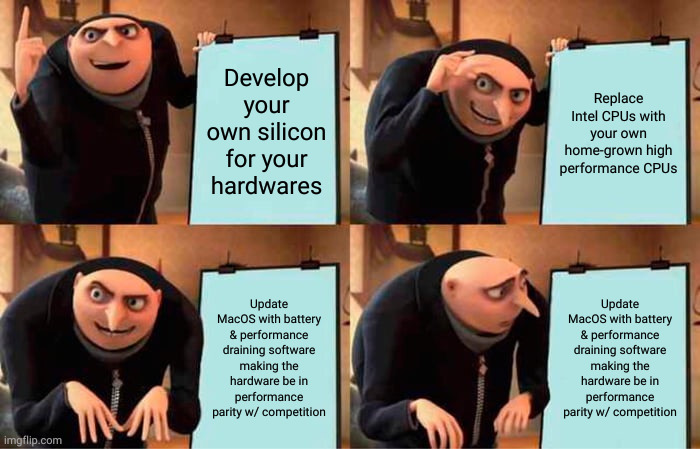
The meme I created after the initial Liquid Glass introduction to MacOS.
But it is true. A reliable software is punished all the time. Either by the users or by the management of the company who makes them. Android major version updates are called as boring from the last several updates. And I expect a Liquid Glass waiting to happen there with Android. Cos it was the same for iOS. Booom! Liquid Glass. The other sad reality is if the software is too stable and functional, layoffs are coming for the team. And behold, soon enough, the software becomes crappy. LLMs will fill this gap apparently.
You see how I started talking about software and not just UIs? Because we keep forgetting that UX is the whole reason why UI should be bothered about. Which means the UX and the software should be the extension of the UI. And design systems for instance is supposed to cover all of this. Not just the pretty UI. Which is why we need to start working on progressive improvements to UIs and software in general. And stop reinventing the wheel. Boring is better. We don’t need flashy UIs. We want functional software and UIs which progressively improves and stay out of the users way.